By Nate Schlieve, Realityworks Product Support Technician
Creating and organizing a well-run RealCare Baby program can take careful preparation and planning. Here are 5 key strategies that successful users have shared to keep in mind when starting a new program or even when revamping an old one!
Organize Your Program:
- Take an inventory your resources
- Number all items so that you can easily put sets together including: ID, Diapers, Baby, Clothing, and Other Accessories
- Create a bin for each Baby and its matching accessories
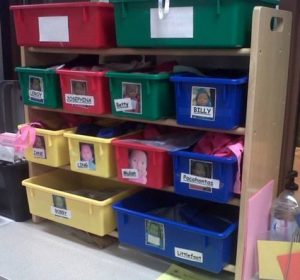
Prepare YOU – the teacher:
- Watch the RealCare Student Video
- Take Baby home to get firsthand experience of what your students will be going through
- Prepare permission slips
- Visit our Product Support Page for great resources including FAQs, Guides, and How-To videos!
- Program Baby a few days ahead of the simulation starting
Preparing Students
- Have students sign-up ahead of time if spreading out over multiple nights or
- weekends
- Watch the RealCare Student Video
- Have student download the Student App -FREE for iPhone and Android
- Do a Baby DEMO in the classroom so that students know what steps to take
Pick-up day
- Create stations for students to easily access all items
- Have a student helper or two volunteer to help distribute items and keep things moving along
- Have your inventory list to track which students are going home with which numbered baby and accessories
Return Day
- Have student helpers inventory items as they are returned to make sure all items are returned and intact
- Have your inventory list to track of items as they are returned by each student
- Clean Baby and supplies
- Give students time to write a reflection on how the experience went and what they learned
- If possible, have parents or guardians write a reflection on how the experience went from their point of view
For more great tips check out this great webinar below and visit our RealCare Baby user page: