Editor’s Note (Updated August 2026): Since this article was originally published, RealCare® Baby 4 has replaced RealCare Baby 3 as the current version of the simulator. While this blog still provides helpful guidance for educators getting started with a RealCare Baby program, some references to RealCare Baby 3 and older software have been updated.
“Help! I’m a new RealCare® Baby Program user. Where do I begin?”
Beginning a brand-new educational program or inheriting an existing one isn’t always easy, but thanks to our Product Support Team, knowing where to go to get started is.
One of questions our Product Support Team receives most frequently is, ‘Where do I being with RealCare Baby?” Whether you are just beginning RealCare Baby Program or inheriting a current one, we have the resources to get you started running a successful program of your own.
Here are the three steps we recommend new RealCare Baby Program Users take:
Step 1: Start with RealCare Baby 4 Resources
Whether you’re new to RealCare Baby or taking over an existing program, the best place to begin is with the latest RealCare Baby 4 resources.
Review the getting started guides, quick-start videos, and instructor resources available in our RealCare Baby User Center to familiarize yourself with setup, programming, reporting, and curriculum implementation.
Visit our RealCare Baby User Center.
Step 2: Familiarize Yourself with Your Equipment and Program Resources
If you’ve inherited an existing RealCare Baby program, first verify which version of RealCare Baby your school owns. Understanding your equipment will help ensure you’re using the correct accessories, software, and support materials.
RealCare Baby 4 includes updated technology and companion resources designed to simplify setup, programming, reporting, and classroom management. Be sure you have access to all program components and instructor materials before launching your first simulation.
Questions about equipment, software, charging, or simulator indicators? Our Support Center includes video tutorials, FAQs, downloads, and troubleshooting resources to help you get up and running quickly.
Visit our RealCare Baby Support Center.
Step 3: Download our RealCare Baby Program Pacing Guide
Once you’re familiar with your RealCare Baby equipment and support resources, it’s time to start planning your instruction.
Our RealCare Baby Program Pacing Guide provides a week-by-week framework designed to help educators successfully implement the program in their classroom. From preparing students for the simulation experience and teaching infant care concepts to debriefing results and extending learning, the guide outlines activities, resources, and instructional recommendations to support every stage of the program.
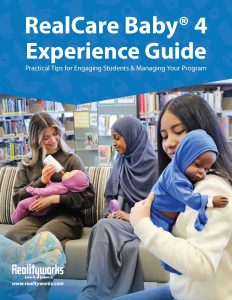
Whether you’re launching a brand-new RealCare Baby program or looking for fresh ideas to enhance an existing one, this guide can help you maximize student engagement and learning outcomes.
Ready to get started? Download the RealCare Baby Program Pacing Guide for practical implementation tips, lesson ideas, and a suggested sequence of instruction to help you plan with confidence.
Download the RealCare Baby Program Pacing Guide
For more than two decades, RealCare Baby has helped educators provide meaningful, hands-on learning experiences. As the program has evolved, so have the resources available to support instructors. We encourage you to explore the latest support materials and take advantage of the tools designed specifically for RealCare Baby 4. If you need additional assistance, we’re happy to help!

Hi! I accidentally removed a baby from the control center. How do I add it back?
Thank you!
Thank you for reaching out, Sam! According to our product support team, you can watch video instructions for adding your Baby back again here: https://youtu.be/xMNKks52Wjo Feel free to contact us if you have any questions or concerns! 800-262-3806, information@realityworks.com or live chat on our website. Thanks again!