With learning environments continuing to shift, many instructors are finding themselves quickly pivoting from in-person instruction to remote and hybrid models. This requires a new way of thinking and using your classroom resources to teach content. Simulators are remarkably flexible for teaching in a variety of learning environments. Follow the steps below to teach a remote lesson on pregnancy (and facilitate a pregnancy simulation), with or without our own RealCare® Pregnancy Profile® Simulator.
Already have the Pregnancy Profile Simulator in your classroom? That means you already have access to a comprehensive curriculum of 12 lessons with dozens of activities and exercises that can be adapted for remote learning.
Don’t have a pregnancy vest (yet)? We’ve made the curriculum from our Pregnancy Profile Simulator available to everyone to support teachers during the COVID-19 pandemic.
Keep reading to learn our best ideas for using the Pregnancy Profile and curriculum assets to make remote learning engaging and interesting.
Start by preparing your lesson plans
Start by accessing our Understanding Pregnancy curriculum, which you can download here. Again, this curriculum comes with our Pregnancy Profile Simulator, and includes lesson plans, student handouts and PowerPoint slides.
Then, determine how many lessons you’d like to teach on the topic and develop a short syllabus by topic. For example, a one-week unit could be:
- Pregnancy
- Fetal development
- Medical aspects of pregnancy
- Birth: Stages of labor
- Issues post-birth (postpartum depression, impact on relationships, etc.)
For content focusing specifically on pregnancy from the viewpoint of the expectant mother, we recommend Lessons 3 and 4. Lesson 3 introduces students to what it is like to be pregnant.
Facilitate a pregnancy simulation remotely
Lesson 3 is the lesson where, if your students were learning in person, they would participate in a pregnancy simulation experience by wearing the Pregnancy Profile Simulator. If you are in a hybrid environment, you can kick off this topic by having students wear the Pregnancy Profile and deliver the rest of the lesson content online.

If you are in a remote learning environment, here is an easy, DIY pregnancy simulation experience students can do at home to understand what it is like to be pregnant.
First, take a backpack and begin to fill it with a total of 25-30 pounds. The goal is to fill up the space in the backpack representing average weight gain by the third trimester. Then, have the participant wear it backward so they can feel the difference in their center of gravity.
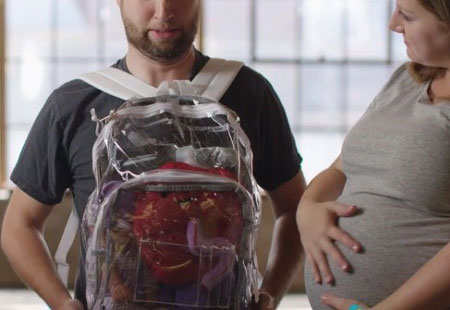
Or, you can simply take something you can fill with warm water like a hot water bottle or a beachball (partially filled up) and wrap it in a baby wrap or sling and wear it low on the abdomen. You could also use a medicine ball or smaller exercise ball that has some weight to it.
Have students do the list of tasks from Lesson 3:
- Bend over to pick up something (pencil or pen)
- Walk up and down stairs
- Tie shoes
- Sit down and stand up several times
- Lie down to experience side-lying position
Wrap up with reflection
After you’ve given your students a chance to experience a pregnancy simulation, wrap up your lesson by giving them access to the debrief questions found in Lesson 3. Post these as a reflection exercise, journal writing or even in a discussion forum.
- What physical stresses or limitations did you notice while doing the pregnancy simulation?
- Was your observation similar or different from others who did this?
- What was a new or different sensation for you as you completed the simulation?
- Based on current knowledge about pregnancy, how realistic do you think this experience was?
- How would this affect your ability to function throughout a school day, weekend, or month-to-month?
- What lifestyle changes would have to be made to accommodate a “pregnant body?”
Augment the lesson with additional content found in Lesson 4, Pregnancy Symptoms and Discomforts. The activities in this lesson are all available in Google Docs and can easily be adapted to an online format.
Choose a video from YouTube on the physical changes of pregnancy. There are dozens to choose from. You can embed or share the link in your LMS system. Here is just one example:
- Pregnancy Month by Month (10:05)
Don’t be afraid to start small
So, now what? If this seems overwhelming, start small. Choose one or two activities try to online. If that works, then try a complete lesson.
There are many ways to use the tools and curriculum you already have available in new and different ways to keep your students engaged and learning!
Resources for learning more
Do you need more lessons for teaching online? Check out these recent posts: