Wearable simulators are powerful teaching tools. When teaching lessons on pregnancy, incorporating a wearable pregnancy vest is a great way to help students understand what pregnancy is like. But how can you create that experience in a remote or blended learning environment? We recently hosted a free webinar to show instructors how to use the Pregnancy Profile Simulator in remote, hybrid or in-person learning environments. Keep reading to find out how. You’ll also learn how to create a DIY pregnancy simulation yourself.
What is the Pregnancy Profile Simulator?
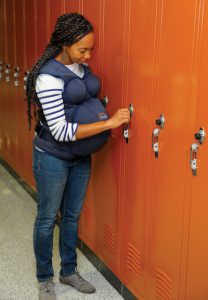
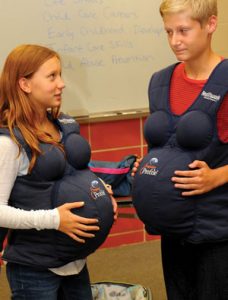
The RealCare® Pregnancy Profile® Simulator replicates the third trimester of pregnancy. This wearable pregnancy vest and curriculum helps users understand pregnancy’s impact on the body as well as life goals, finances, relationships, and emotions. Users experience a 25- to 30-pound weight gain and many symptoms found in the third trimester of pregnancy. Instructors use this educational tool with males and females in many programs across the country.
The Pregnancy Profile comes with everything you need to let students experience the final stages of pregnancy, including:
- Pregnancy Profile vest with 3 adjustable straps
- A water bladder which, when filled, simulates elevated body temperature and fetal movement
- A rib constrictor belt worn underneath the vest to simulator pressure from fetal limbs and difficulty breathing
- A weight bag to add to the average weight gain felt by the third trimester
A carrying case, t-shirt and 12-lesson curriculum are included as well. When wearing the vest, users will experience a variety of symptoms, from weight gain and elevated body temperature to pressure on the bladder and fetal kicking movements.
Comprehensive curriculum you can tailor to your own needs
Whether you’re teaching in person, remotely or in a blended learning environment, we know you might not have time to incorporate all 12 lessons from our Pregnancy Profile curriculum. In her webinar, Denise shared ways you can tailor the curriculum to your own needs, whether you need to create a 1-week lesson plan or longer.
We’ve made the curriculum from our Pregnancy Profile Simulator available to everyone to support teachers during the COVID-19 pandemic. There are dozens of lessons plus presentation slides, information and activities. We have also created a version of the curricula documents so that they can easily be used in Google Docs. Click here to access the curriculum.
Sample syllabi and instructions for short units on pregnancy and childbirth
A 5-day unit on pregnancy and childbirth might look like this:
Day 1 – The Physical Changes of Pregnancy. Start with the Pregnancy Profile simulation experience in person or DIY simulation if remote. (Minimum 20 minutes). Perform tasks. Refer to Lesson 3. Discussion questions can be used as a debrief written exercise.
We recommend this video: “Physical Changes of Pregnancy” https://www.youtube.com/watch?v=DJafpULobE8
Day 2 – Pregnancy Symptoms and Discomforts. Reference Lesson 4. Share slide contents. Give access to Pregnancy Symptoms and Discomforts worksheet and How Would I feel if I (or my girlfriend) Were Pregnant Now? exercise. In person, invite a pregnant/parent speaker to answer key questions or online invite to a Zoom panel. Conclude with review activities including a “reaction” story.
We recommend this video: “Common Discomforts of Pregnancy” https://www.youtube.com/watch?v=seg6h1s8BHc

Day 3 – Fetal Development. Access Lesson 5. There are 9 activities to choose from. For short unit choose Slide presentation to share on Fetal Development. Share all of the Fetal Monthly Development Information. Complete the Trimester Characteristics activity.
We recommend this video: “Pregnancy Week to Week” https://www.youtube.com/watch?v=VktZZEeGdSs
Day 4 – Medical Aspects of Pregnancy. Access Lesson 8. Share slide presentation and handouts on Medical Care, Doctor Visits and Prenatal Tests. Access Lesson 5 and give access to Disease Detective research project and Hereditary Disease information.
We recommend this video: “Ultrasounds During Pregnancy” https://www.youtube.com/watch?v=SuiV4ATK7O0
Day 5 – Birth Process. Access Lesson 9. Assign the “When I was Born” activity. Share slides/lecture notes for Labor and Delivery presentation. Provide review quiz on questions provided in the last section of the lesson.
We recommend this video: “Stages of Labor” https://www.youtube.com/watch?v=iaVuIaVpx5Q
Watch the complete on-demand webinar to see a sample 2-week unit as well.
Remote teaching ideas
If you cannot be in person for students to experience the Pregnancy Profile simulation, here are a few do-it-yourself projects you can try.
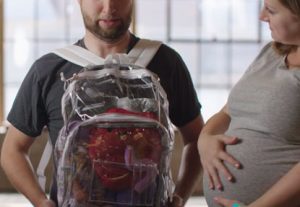
First, take a backpack and begin to fill it with a total of 25-30 pounds. The goal is to fill up the space in the backpack representing average weight gain by the third trimester. Then have the participant wear it backward so they can feel the difference in their center of gravity.
You could also take something you can fill with warm water, like a hot water bottle or a beachball (partially filled up) and wrap it in a baby wrap or sling and wear it low on the abdomen. You could also use a medicine ball or smaller exercise ball that has some weight to it. Have students try to tie their shoes, pick things up off the floor, sit and stand up, etc.
Here are several YouTube videos. One that show how some people have created their own “empathy bumps” and the other showcasing the Pregnancy Profile being worn for a day.
“DIY pregnancy: How to create an empathy bump” (1:44): https://www.youtube.com/watch?v=DThWLfxKPDU
“Husband Wears Pregnancy Belly for a Day” (12:54): https://www.youtube.com/watch?v=BhqEhvTatoQ
100% Remote teaching ideas
What can you do if your students are 100% remote?
If your students are able to come to school to pick up items, you could send the Pregnancy Profile home with students (it comes in a convenient storage bag).
You could also have students conduct a DIY experience at home using these apps:
Baby & Mom – Pregnancy Idle 3D Simulator: https://play.google.com/store/apps/details?id=com.AlexGame.PregnancyIdle&hl=en_US&gl=US
Pregnant Mother Simulator – Virtual Pregnancy Game: https://play.google.com/store/apps/details?id=com.pregnant.mom.games&hl=en_US&gl=US
Hybrid and In-Person teaching ideas
Having students do the pregnancy simulation is inherently an in-person experience most of the time. Here are 3 questions you need to ask yourself whether you are in an in-class environment, hybrid or totally remote:
- How many Pregnancy Profile simulators do you have to use that are available?
- How many students do you have that you wish to do this experience with?
- How much time do you have for this experience in the course?
Just like in-person planning, decide how much time you would like to dedicate to the pregnancy experience and how many days you’ll need. Go through the curriculum at least two weeks before you are ready to begin the program, to determine which parts of each unit you will be covering so you can prepare. We have exercises available in Google Docs for ease of use if you want to use them in Google Classroom or post on an LMS system.
Remember to encourage group interactions whenever possible so students can build off of each other’s experiences. Consider creating stations from the various Pregnancy Profile items, to implement a variety of experiences to rotate through. It also makes classroom management easier, with less wait time for students. And always remember to debrief.
Resources for learning more
Looking for more resources for how to use the pregnancy profile simulator remotely, plus other teaching ideas? Consider these resources:
- Watch our complete webinar on-demand anytime, “How to Use the Pregnancy Profile Simulator® in Remote, Hybrid or In-Person Learning Environments”
- Access free career exploration curriculum related to FCS topics, including pregnancy and reproduction, here.
- Access free posters on a variety of topics, including teen pregnancy and infant health and safety, here.
Interested
Thanks for stopping by, Fiona! We’re thrilled you found this blog post interesting. If you have any specific questions or concerns, please feel free to contact us by phone (800-830-1416), email (information@realityworks.com) or live chat on our website. We’re happy to help! 🙂